

A product leader who runs a 200-person team just said your job won’t exist in five years.
He’s half right.
And the half he got wrong is the half that gets you hired.
Srinivasan Raghavan runs product at Freshworks. On Aakash Gupta’s podcast, he said engineering, design, and product management are all going to collapse into one thing soon. We’ll all just be “product builders.” That clip is everywhere now. So is the head of Google’s Gemini saying teams should move “from PRDs to prototypes.” So is every AI guy on your feed shouting “write loops, not prompts.”
And somewhere in all that noise, a lot of people have quietly decided the same thing: the PRD is dead. Stop writing docs. Just build stuff.
If you’re an IT professional trying to move into product, please don’t fall for that. Here’s what it costs you.
You walk into a PM interview at Razorpay, or Flipkart, or some fast-growing startup. The hiring manager leans back and says, “Walk me through a PRD you’ve written.” And you go blank, because some creator with 400k followers told you PRDs were over.
That interview is finished. You just don’t know it yet.
So let me tell you what’s actually going on, because it’s genuinely good news. The PRD didn’t die. It changed jobs. And the person who understands both versions of it, the old one and the new one, is exactly who gets hired in 2026.
By the time you finish this, you’ll have that understanding, a fill-in-the-blank template you can use tonight, and a full worked example you can copy. My goal is simple: this should be the last thing you ever need to read about writing PRDs in the AI era.
Quick note on who this is for. You are in IT — dev, QA, BA, support or delivery — you have five-plus years behind you, and you are trying to move into product without taking a pay cut. If that is not you, the rest of this is still interesting. It just will not be useful.
If you take one line from this whole post, take this: the prototype now shows what you’re building. The PRD shows why, how you’ll measure it, and when you’ll kill it. Get that, and you sound like a 2026 PM instead of a 2019 one.
What’s in here
Why a teardown and a PRD are not the same thing
Why the PRD existed at all, and what AI actually broke
The one shift that changes everything
The part almost nobody is telling you
What hasn’t changed, and won’t
The 2026 PRD template, yours to steal
A full worked example, top to bottom
What this means for your next interview
A checklist to run this week
First, a thirty-second cleanup: a teardown is not a PRD
People mix these two up constantly, so let’s settle it fast.
A product teardown is what you show to get hired. It’s high-level. It proves you can think, that you can spot a problem and reason your way to a solution. Your audience is a hiring manager.
A PRD is what you write once you’re already in the job, so your team builds exactly what’s in your head. It’s detailed. Every screen, every tap, every error message. Your audience is the developers, designers, and QA who have to build the thing.
One proves you can think. The other proves you can execute.
You need both. And every mistake in the “PRDs are dead” narrative is about the second one. So that’s what we’re fixing.
The PRD used to be a permission slip
This is the part nobody explains, and once it clicks, the whole debate suddenly makes sense.
Why did the PRD always come first? Idea, then PRD, then design, then build, then test, then ship. Why write a long document before anyone touched the actual product?
One reason. Building was expensive.
For twenty years, the costliest thing in any company was engineering time. “Don’t waste the devs” was the rule nobody wrote down but everybody followed. So before you burned six weeks of that time, you had to write a document proving it was worth it. You needed sign-off. You needed everyone nodding at the same plan. You needed permission.
That’s all the PRD really was. A permission slip. A document you wrote to earn the right to build.
Hold that thought, because AI just blew up the entire reason it existed.
Then building got 100x cheaper
Here’s the actual change. Not “AI is coming.” Something you can see and touch.
A working prototype used to take six weeks. Now it takes an afternoon.
You point an AI tool at a design system, tell it what you want in plain English, and it builds a clickable version of your feature while you finish your chai. On Aakash’s podcast, he put the new math bluntly: the thing that took six weeks now takes about 45 minutes.
If you’ve never actually done this, here’s how normal people are doing it right now. Tools like Lovable, v0, and Bolt turn a plain-English description into a working web app. Figma Make turns a design into something you can click through. Claude and ChatGPT will build the whole thing by conversation and rewrite it ten times while you react.
You don’t have to be technical. You describe, it builds, you react. That’s the loop.
And that one change breaks the old model completely. When building is cheap, you don’t need permission to build anymore.
So the order flips.
The old flow, slow because building cost a fortune:
Idea → PRD → Design → Build → Test → Ship
The new flow, fast because building is nearly free:
Idea → Build 5 rough prototypes → Look at them → Kill 4 → Then write the PRD for the one that survived → Ship
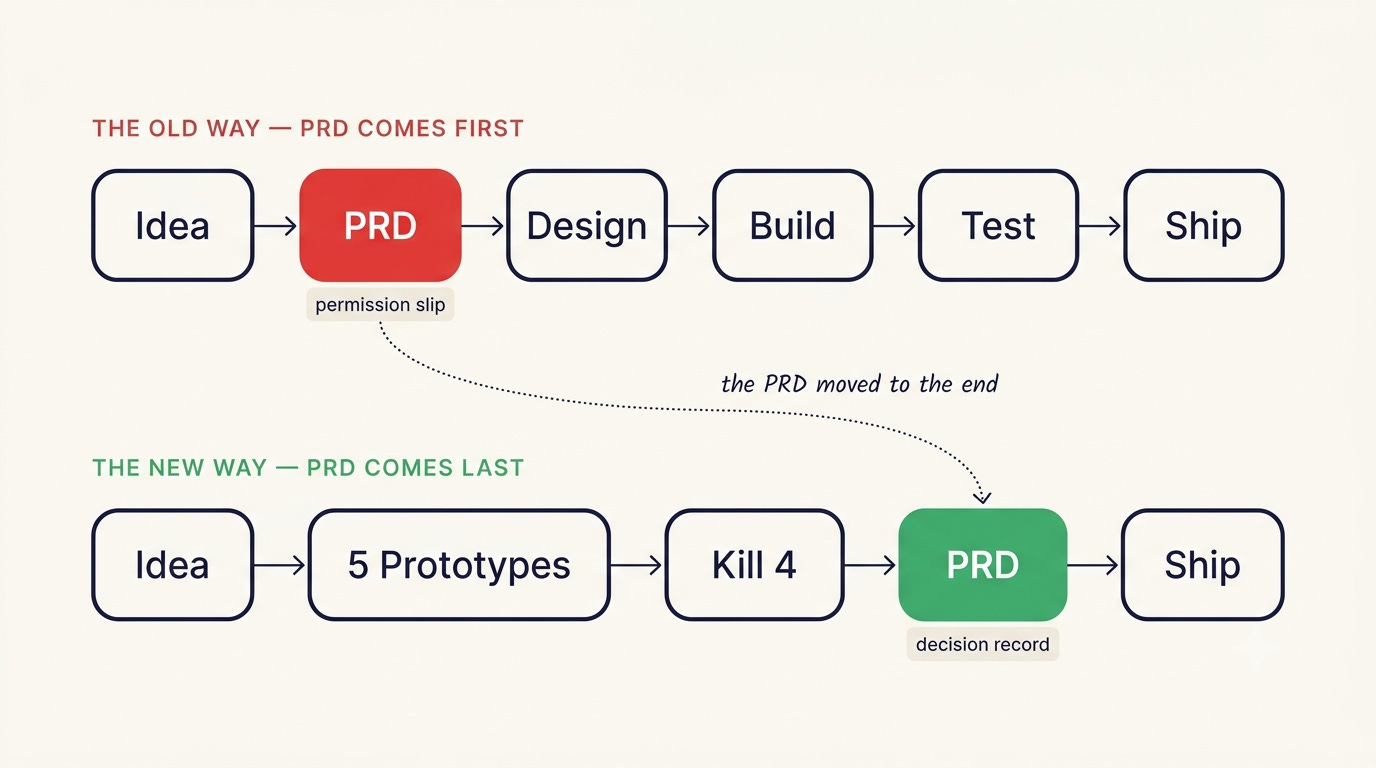
Look at that second flow again. The PRD moved to the end.
You don’t write a document to get permission to build. You build first, five scrappy versions of it, and then you write the doc for the one that won.
So the PRD didn’t die. It changed jobs.
When it moves from the front to the back, its whole purpose changes with it.
At the front, it was a permission slip. “Here’s what I want to build. Can I?”
At the back, it becomes a decision record. “Here’s what we built. Here’s why this version beat the other four. Here’s how we’ll know it’s working. And here’s when we’ll pull the plug.”
Same document. Totally different job.
And once it moves, what goes inside it changes too, because the prototype now answers a bunch of the questions the old PRD used to.
The prototype shows the screens. The layout. The buttons. The flow. Nobody needs three paragraphs describing a login screen when they can click through a real one in five seconds.
So the new PRD stops describing what the thing looks like, and starts capturing what a prototype can’t show you:
The prototype shows the WHAT. The PRD shows the WHY, the HOW you’ll measure it, and the WHEN you’ll roll it back.
That single line is the whole shift. Write it on a sticky note.
The part almost nobody is telling you
This is where most creators stop. I’m going to give you the bit that separates someone who actually understands product from someone who just reposts the trend.
Everyone keeps saying AI shrinks the PRD. For a simple feature, fine, it does.
But watch what happens as your product gets more AI inside it.
A normal feature shows you what it does. A button does the same thing every single time. You can screenshot it. A prototype captures it perfectly.
An AI feature decides. Ask it the same question twice and it can answer two different ways. It can be wrong. It can make things up. It can say something it should never, ever say to a user.
You cannot screenshot a decision.
So how does your developer know what “correct” even looks like? How does QA test it? They can’t click a prototype and see it, because the behaviour lives across thousands of possible answers, not one fixed screen.
The only way to pin it down is to write it. This is the behaviour contract, the part of your PRD that spells out exactly how your AI feature should act.
Here’s a real one, for an “explain my bill” assistant inside a payments app:
It answers only from the actual transaction data on file. It never guesses.
If it doesn’t have the data, it says: “I can’t see the details of that charge, but here’s how to raise a dispute,” and links the dispute flow. It never invents a reason.
It never gives financial or investment advice. Asked for it, it replies: “I can’t advise on that, but I can tell you what this charge was for.”
Calm, plain tone. No jargon. Three sentences, max.
It never states a rupee amount it can’t pull from the real record.
A prototype could never tell your team any of that. Only a written spec can.
So here’s the rule I’d tattoo on every aspiring PM: the more your product decides on its own, the more weight the PRD carries. It isn’t dying. For AI products, it’s becoming the most important thing you write.
What hasn’t changed, and won’t
Now the reassuring bit. Under all the hype, the core of a strong PRD is exactly what it’s always been. AI just stripped the padding off it.
Every PRD, in every era, answers four questions.
What are you building? Who is it for (name a real person, not “users”)? Why does it matter? And how will you measure success?
That third one, the why, is the one everybody skips. Don’t. Product management is the why. If you can’t say clearly why this thing should exist, stop writing and go figure that out first.
And the bar for a finished PRD is the same test I’ve been teaching for years. I call it the Golden Standard:
When you’re done, ask yourself one question. Could someone build this feature using only this document, without asking you a single thing? If yes, it’s done. If there’s even one question they’d have to come back to you with, it isn’t.
One upgrade for 2026. That “someone” used to mean a developer. Now it means a developer or an AI agent, because more and more, the thing reading your PRD and building from it is a machine. And a machine won’t use common sense to cover your gaps. It builds exactly what you wrote. Gaps included.
Vague PRDs were always risky. Now they’re fatal.
Which is why the same three mistakes still sink most of them.
First, skipping the why. “Improve the payment experience” isn’t a why. It’s a wish.
Second, writing only the happy path. Real products break. If you haven’t said what happens when the payment fails, the network drops, or the screen is empty, you haven’t finished.
Third, leaving the words to the developer. Write “show an error” and the developer writes the actual message. Developers write awful user-facing copy. That’s your job. You decide what it says.
The 2026 PRD template. Steal it.
Here’s the whole thing in one place. Timeless core, plus the new decision-record layer on top. Copy it, fill the blanks, and you’ve got a PRD that reads like it was written this year.
The decision this records. One line: what you’re shipping and why this version won.
Purpose (one page, no more). What you’re building. Who it’s for, by name. Why it matters, with a number. And your hypothesis: “We believe X will cause Y.”
The prototype. Drop the clickable link here. This is your “what it looks like.” Don’t rewrite it in paragraphs.
Features and how they work. The heart of the doc. Step by step, every screen, every click, every field, every edge case, the exact error copy, a design for each state. If there’s AI in the feature, add the behaviour contract: how it responds, what it must never do, its fallback when it’s unsure, its tone and limits.
Success measurement and evals. The metric, and the number it has to hit to graduate, with a deadline. For AI features, an eval set: 20 real inputs with the right answer for each, so anyone can check whether it actually works.
Scope and non-goals. What’s in. What’s deliberately out. What trade-offs you’re accepting on purpose.
Rollout and rollback. Everyone at once, or 5% first? What’s your kill switch? What number makes you pull it?
Release criteria and change log. The definition of done, written so it can actually be tested. Plus a running log of what changed and when, because a PRD is a living document, not a file you write once and forget.
I’ve put all of this into a clean one-pager you can keep open beside you while you write. Grab it below and use it on your very next teardown.
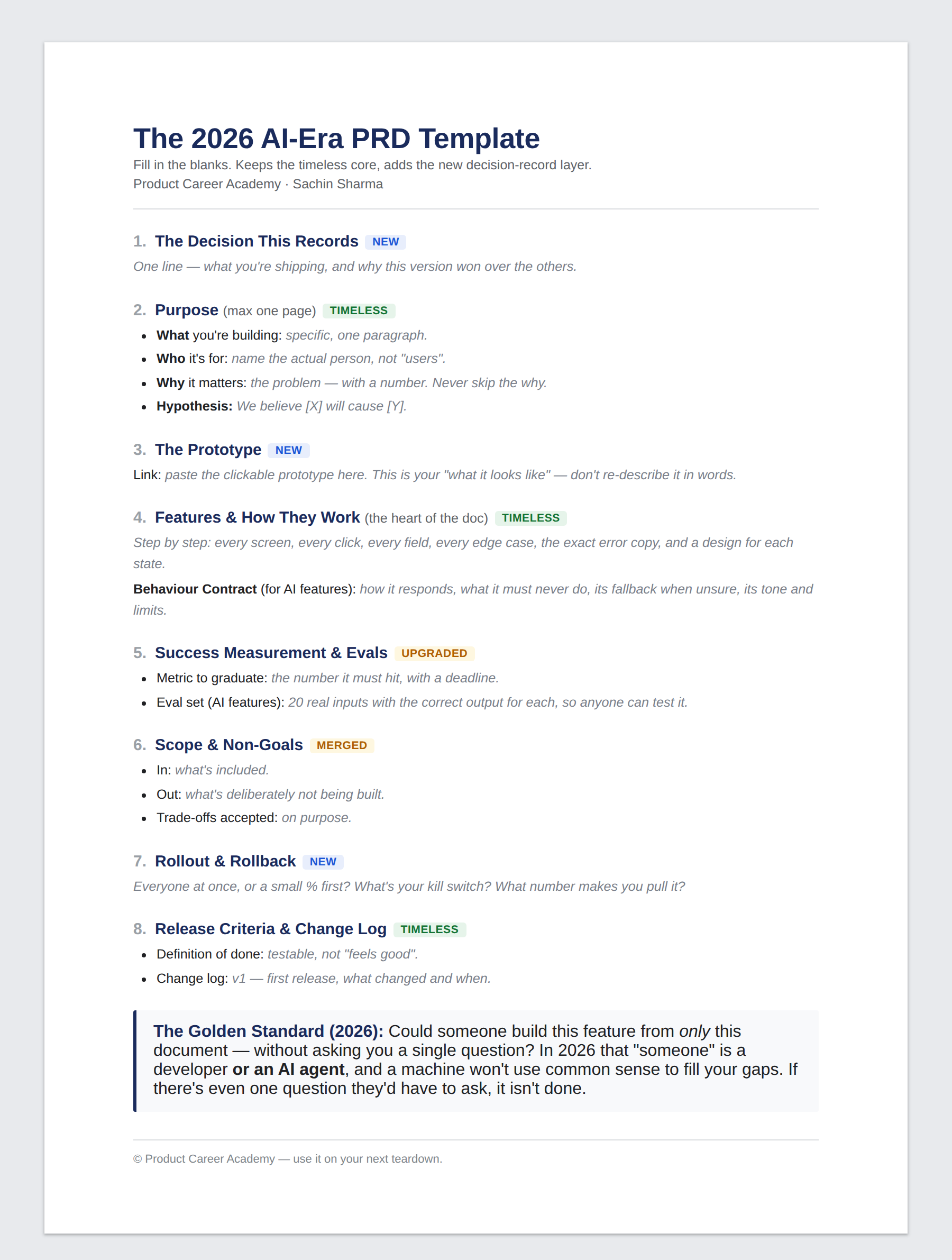
That one-pager is the map. This is the version you can actually write in — all eight sections as a print-and-fill PDF, including the behaviour contract most people leave out, and the CRED “explain my bill” example filled in end to end so you can see how much detail is enough.
Open the 2026 AI-Era PRD Template →
Watch it work: one feature, top to bottom
Templates are easy to nod along to and hard to actually use. So here’s a filled-in one. An AI “explain my bill” assistant inside a CRED-style payments app.
The decision this records. Ship the bill-explainer as an in-app chat on the transaction screen. This version won because people trusted a short plain-text answer more than a fancy redesigned statement.
Purpose. We’re building an assistant that answers “why is this charge here?” in plain language. It’s for Rahul, 32, salaried, checks his card bill on his phone and panics at anything he doesn’t recognise. Why it matters: last quarter, 18% of all support tickets were some version of “what is this charge,” costing the support team roughly 40 hours a week and quietly killing trust in the bill. Our hypothesis: an instant, plain answer cuts those tickets in half and takes the anxiety out of it.
The prototype. [Figma or Lovable link to the clickable chat on the transaction screen.]
Features and how they work. User taps a charge. An “explain this” button shows up under it. Tapping opens a chat sheet already filled with “Why is this ₹2,340 charge here?” The assistant replies in three sentences or fewer, using the transaction record. Behaviour contract as above: explains only from real data, never guesses, admits when it can’t see the details and points to disputes, never gives money advice, never invents a number. Edge cases: charge still processing shows “This charge is still being confirmed. Check back in a few minutes.” No internet shows “Can’t load this right now. Pull to refresh.” Already disputed shows the dispute status, not an explanation.
Success measurement and evals. Metric to graduate: “what is this charge” tickets drop 50% within six weeks. Eval set: 20 real charge questions with the correct answer for each, a UPI autopay, a foreign-currency markup, an EMI conversion, a failed-then-reversed charge, and so on. It has to nail at least 19 of 20 and invent zero figures before it launches.
Scope and non-goals. In: explaining charges that already exist. Out for now: raising the dispute inside the chat, predicting future bills, any kind of spending advice. Trade-off we’re accepting on purpose: it will sometimes say “I’m not sure” rather than risk a wrong answer. In a money app, that’s the right call.
Rollout and rollback. Ship to 5% of users first. Kill switch: if the invented-figure rate crosses 0.5%, or complaints tick up, pull it that day and fall back to the old “raise a ticket” flow.
Release criteria and change log. Done when 19 of 20 evals pass, zero invented figures in testing, every edge-case screen is designed, and it responds in under three seconds. Change log: v1, first release to 5%.
Notice the why has a real number in it. Notice the metric has a target and a date. Notice the AI’s behaviour is written down, not screenshotted. That’s a 2026 PRD.
What this actually means for your next interview
Now the part that touches your career directly.
Here’s the specific trap for PM aspirants in India. Most interviews at Indian product companies in 2026 still test the classic, detailed PRD. Product sense. Edge cases. The why. Success metrics. So if you’ve talked yourself into “PRDs are dead,” you’ll walk in underprepared for the exact thing they’re going to ask you.
But the ones who stand out do one extra thing. When they walk through a PRD, they show they get the shift. They mention the hypothesis. They talk about a behaviour contract for an AI feature. They bring up the rollback plan. In one answer, they tell the hiring manager: I’m not stuck in 2019, I know how this works now.
That contrast is your edge. The classic rigour gets you in the door. The 2026 layer makes you the obvious hire.
One honest caveat, because I won’t oversell this to you. You’ll hear that Anthropic’s Claude Code team writes zero PRDs. It’s true. The creator of Claude Code has said he ships dozens of code changes a day with no formal spec. But that’s a tiny team of engineers building a tool for themselves, with no outside stakeholders and no regulator breathing down their neck. You’re building for real users, aligning with real stakeholders, and right now you’re being interviewed on this exact skill. You don’t get to skip the PRD while you’re still trying to land the role. Not everyone builds like Anthropic. You, especially, don’t. Not yet.
Do this on your next teardown, this week
Enough reading. Here’s how you turn all of this into an actual portfolio piece.
Take the teardown you’ve already done and pick the one feature you proposed in it. Open the eight-part template. Write the Purpose first, and force a number into your why. If you don’t have one, estimate it. “I think it’s roughly X” beats “improve the experience” every single time.
Then write the Features section to the Golden Standard. Every screen, every click, every error message, in your own words. When you’re done, ask the question: could an AI agent build this with zero questions?
If your feature has any AI in it, write the behaviour contract and the 20 evals. This one move alone puts you ahead of almost everyone else applying.
Then add rollout and rollback. Even a single line. It shows you think past “ship it,” and hiring managers notice that immediately.
Do that once, properly, and you’ll have something no certificate can hand you: proof you can think and execute like a PM in 2026.
One quick story before you go
A student of mine, Sundeep, sent me a PRD for an internal data-reconciliation tool.
Honestly, the edge cases were some of the best I’ve seen from a first-timer. Eleven scenarios, escalation paths, validation rules. Real “I’ve watched things break in production” thinking.
But three things were missing. And they’re the three this whole post is about.
His why had no number. “Leadership lacks confidence in reporting” is a feeling, not a fact. I told him: give me “the Surrender metric showed a 5%-plus variance in 4 of the last 6 cycles, costing the COO’s team 3 days a cycle to chase down.” That’s a why.
His Purpose had no success metric at all. Three of the four questions answered, and the how-will-we-measure-it just wasn’t there. So nobody reading it knew what winning looked like.
And his Features section read like a summary, not a spec. It told me what the outcome was, not how the thing worked. A developer would’ve come back with a dozen questions. It failed the Golden Standard, and Sundeep knew it the second I said it out loud.
None of that was a talent problem. It was a nobody-showed-me-the-standard problem. And that’s fixable in an afternoon. Which is the whole reason I’ve put the standard, the template, and the example in one place for you.
The gap between a PRD that gets you shortlisted and one that gets ignored is almost never talent. It’s whether someone showed you the bar before a hiring manager did.
If you want to know whether your background is ready for a PM move, and exactly which of these skills you already have versus the ones you still need to build, book a 1-1 Career Mapping Call with my team. We’ll look at your real profile, tell you where you actually stand, and map out what it would take to get hired.
Not what you want to hear. What you need to hear.
Sachin Sharma is the founder of Product Career Academy and has coached 1000+ IT professionals into product roles. He teaches devs, BAs, QA, and analysts how to become AI-first product managers.
P.S. If you do only one thing from this post: open the template, pick the last feature you shipped, and write section 1 for it. One line — what you shipped, and why that version won over the other options. Most people have never written that sentence about their own work. It is the sentence an interviewer is actually listening for.
And if you would rather have someone look at your actual profile and tell you honestly whether you are closer to a PM offer than you think, or further, that is what the Career Mapping Call is for.
Read next:
→ Why Your IT Background Is Quietly Preparing You for Product Management
→ The 90-Day Blueprint to Get a PM Role Without Starting Over